Friday, December 12, 2008

Architecture again

Right after my last post (which I was on my mind because it happened to me a couple of times this year and the last year), I discovered (thanks to a post from a friend patterns & practices- App Arch Guide Pocket Guides) that MS PnP has some interesting stuff on this topic (shame for not looking recently on PnP).

Apart from the pocket guides, that I haven't looked into, what I found were some cheat sheets and diagrams.

PnP Application Architecture Frame Cheat Sheet describes architecture frames (authentication, caching, ... and 14 others), quality attributes (14) and the mapping between application types, architecture styles and the architecture frames (and the common issues). It's great stuff, and should be mandatory read for every developper. Shame that Microsoft only has teaching offerings around products (maybe that's what the industry cares about).

ArchMetaFrame

Another one is PnP Application Type Matrix Cheat Sheet that summarizes the main application types, their benefits, considerations, scenarios and solutions.

The last one is PnP Visio index Diagrams that MS makes available for modification and use to document our architectures. Even if only used for proposals, it's very good and allows reuse.

Marcas Technorati: ,

Friday, December 05, 2008

Architecture & Process

Lately, I've been surprised by how little attention some developers pay to application architecture. By architecture here, I mean to say the high level decisions that crosscut all the application code.

Recently, during the transfer of an application from another team, I was shocked that there was no clear vision of the main decisions regarding some fundamental aspects of a web application (I don't mean documented, just a clear definition of the decision or the approaches taken in the implementation). Every web application should make explicit the major decisions (and the reasioning behind them) regarding:

    • Logging (policy - how, when; and tools/code)
    • Exception Handling
    • Data Acess (ADO.NET, ORM, Linq)
        • Transaction Management (sharing the same transaction, creating and commiting transactions)
    • Session Management (asp.net memory, DB, custom)
    • Security (low-level - sql injection, cross scripting; high-level - isolate data between different users/entitys/geographically)
    • Profiles and Permissions (management of users/groups and the corresponding permissions on application functionalities)
    • Operation Auditing (especially in financial systems)
    • Composition (tiers, layers, service oriented)
    • Dependencies (3rd party tools, components, services)
    • Patterns used (MVC, Singleton, Composite)
    • Naming conventions
    • Configuration management (reference tables, configuration values, connection strings, etc)
    • Concurrency (synchronizatios, async callbacks, threading)
    • ...


There's also other important stuff, more on the process/principles side, that gain by being defined:

    • Planning, prioritization & risk management
    • Organization (teams, projects)
    • Tools
    • Automation of tasks (building, testing, importing reference data)
    • Testing and Coverage (unit testing, integration testing, coverage of significant program states)
    • Refactoring
    • Documentation (design, architecture, glossary, major entities, workarounds to problems)
    • Bug/Incident tracking
    • Version Control (tool, policy)
    • Communication
    • DRY
    • Responsabilities (code & people) and Separation of concerns
    • Coupling & Cohesion
    • Done?


As with everything, there's also the risk of overdoing stuff, or doing it as an end (and not as mean to an end).

If just 1/3 of the list were implemented, maintenance would be such an easier job...

Marcas Technorati: ,

Friday, August 01, 2008

SQL set approach

SQL is a powerful tool that can be a great help for solving some problems. You just have to think in a set oriented approach (Thinking in Sets by Joe Celko comes to mind). I just hope thinking this way doesn't transform me into some uptight person that thinks less of everyone else, just because they don't understand it initially. And this approach must not be taken as a dogma, or an end in itself. If a solution doesn't appear in some reasonable time, I resort to iterative approaches. Better not even get into primary keys discussion and business identifiers... (end of rant)


Today, during the implementation of an algorithm for shift atribution, the client asked for the implementation of some exceptions when there wasn't anyone available in the specified region. After some discussion, the algorithm should cope with this situation by looking up in the neighbour regions, then in a larger area, and finally the whole country. As the algorithm isn't just a select (it has more rules), I didn't want to replicate the whole algorithm for each universe or apply the algorithm iteratively for each region (that would also distort the ordering and equity of the algorithm).


After some brainstorming, the problem was how to change the universe in which to look by joining to the region table. And as I was to give up, the solution became evident: what was needed was filtering the universe. But how if the table doesn't have in itself all the attributes to determine the regions?

One way would be to compute the regions with a function and using a dynamic query with an in filter. Something like:

regionId   IN  
    dbo.fnComputeRegions(regionId, coverage)

But that forced us to use dynamic querys and the in could become quite big (there are a couple hundred regions).

Then, a better solution came to my mind: the problem was in the join, so the query should join with a table valued function that returns a table with the regions to lookup. This solution didn't force the use of dynamic queries and allowed us to reuse the whole algorithm just changing the join, surrounding the algorithm with a while that changes the coverage:

while (coverageId < numberOf Coverages)

     (algorithm)

     select ...

     from

        Region R

        inner join dbo.fnComputeRegions(regionId,
              coverageId) CR on R.regionId = CR.regionId


With this approach we gain abstraction and independence of the computation of regions (it can return a table with one record, the neighbour regions, the neighbour neighbour regions, all the regions within an hierarchy, or all the regions), without changing the algorithm. And what's best is that these computation of regions is reusable in other areas and algorithms.

Now the toughest part is convince the client that this is the best solution and that to these rules there must be no exception :)

Marcas Technorati: ,

Wednesday, February 27, 2008

Thursday, February 14, 2008

Classic Books

I really like reading, specially blogs, because of their small format (one can read a couple of entries in a couple of minutes). Nowadays, I don't really buy that many books as much of the information is available on the web. The exception to this is some classic books or intemporal books (Patterns, Methodology, Usability, ...) that I buy and try to read (usually takes me a long time because of interruptions, priorities, certifications, ...).

But recently there's been a trend on releasing classic books and articles free on the web:


There are some great gems (Macintosh Human Interface Guidelines, Structured Programming) available, some books related to Lisp, Smalltalk, and other esoteric languages, and CMG papers (mostly performance and ITIL).

Marcas Technorati: ,

Wednesday, February 06, 2008

Microsoft and Yahoo

It's not the most recent news, as it's been dissected and commented by everyone else, but nonetheless an interesting topic.

From the MS fan base Hello, Google, can you spell hypocrisy? to the MS (particulary Ballmer) bashing A Defining Test for Ballmer, the most interesting ones were the internal ones Microsoft + Yahoo! = Microsoft - $44,600,000,000 ? and Microsoft and Yahoo! -- Stay on Target?, and Bruce Eckel's Should Microsoft Buy Yahoo?.


The internal perspective focus more on the restructuring, layoffs, overlapping of products and foresee the potential problems (culture, technological - spreading MS technology within Yahoo), and possible sinergies, defining the dominant reaction as: "talk to me in a year".


Bruce Eckel focus is on the acquisitions, and the merge failings when two big software/hardware companies try it. I can't really assess if it is truly that bad, but MS and Yahoo should really be on their toes to avoid the problems. Those that don't learn from history are condemned to repeat it (or something similar).


I really think it's impossible to predict the outcome of this. MS and Yahoo should take close attention to the details of the merge (cultural, tecnological, user base), and avoid imploding themselves.

Google should take attention as MS showed in the past, they can/will use any tactic they can to get back into the game. If MS can leverage their dominant position to spread Silverlight and get control over Web 2.0 content, Google will be in deep trouble. It's not like Google's monopoly generates user lock-in (as MS Windows and Office, and other MS tactics - IE), so they better watch it carefully as changing my search engine is just some clicks away...


So, in conclusion, I guess only time will tell what the outcome will be. Whoever does the fewest mistakes in this game, will take leadership. Although, for the stake of evolution, I hope that no true winner comes out of it, and competition becomes fiercer...

Marcas Technorati: ,,

Friday, February 01, 2008

SQL 2008 is late^H^H^H^H on schedule for Q3

As Joel Spolsky puts it, Microsoft can't speak straight any more. Instead of coming forward and saying SQL 2008 is late, marketing added it's twist to the message (I don't think an engineer can talk this way), transforming a simple message in a convoluted, positive tone marketing speak.

It's on par with Dilbert material:

dilbert2

I think it just transformed an inocuous message of schedule slipage (pretty common in software development) into a comic situation (or patronising, depending on how you take it).

Phil Factor digged deeper and tried to explain it: Microsoft Boy announces his School Homework.

Oh, here's the original message:

The past few months have been an amazing time for the SQL Server team as we gear up for the start of the global launch wave on February 27.

...

Simply put, SQL Server 2008 is a significant release for us – one that builds on all of the great things that we were able to deliver in SQL Server 2005. We see it as a critical step forward for our data platform...

Not surprisingly, one of the top areas of focus for us is always to deliver a high quality product, and in a very predictable manner.

...

To continue in this spirit of open communication, we want to provide clarification on the roadmap for SQL Server 2008. Over the coming months, customers and partners can look forward to significant product milestones for SQL Server.  Microsoft is excited to deliver a feature complete CTP during the Heroes Happen Here launch wave and a release candidate (RC) in Q2 calendar year 2008, with final Release to manufacturing (RTM) of SQL Server 2008 expected in Q3.

...

This does not in any way change our plans for the February 27 launch...

Marcas Technorati: ,

Thursday, January 24, 2008

Dynamic and Static Languages

Ted Neward blogged about the "Can Dynamic Languages scale" debate going on ServerSide. He discusses the two dimensions of scale that are being debated, namely Size (LOC) and capacity (reqs/sec).

Aside the flamefest that the thread became, I always get the feeling that most arguments are somewhat technically based, but very biased.

I'm not a Dynamic Language Programmer. But as I try to stay current on the evolution of Software Development and Languages, I try to read as much as I can about technology that is being touted as the future, or very promising. Not that I immediatly try to use it in production, as I admit that some corner cases could be tricky (or badly done) because of lack of knowledge or technology imaturity. Beyond that, many hot technologies, while having their merits, are pushed way too much because of the hype (CORBA, XML, EJB, SOAP, anyone?) generated by the BIG (MS, IBM, Sun) companies.

Refactoring

Anyway, one of the arguments countering dynamic languages is the ability to refactor it. Namely that the refactoring isn't fullproof and that there can be mistakes. But guess what, Java/.NET because of Reflection, Dependency Injection can also have these mistakes. I agree that tool support is better in Java/.NET, but that's it.

Conciseness

Another argument, these time by the other camp (dynamic languages) is that dynamic languages are more concise. And comparing the best known instances (Java, C#) to Ruby or Python, one would have to agree. And no, even if the compiler could generate it, it's still code left to maintain and read, that distracts from the code intent.

But even that is changing, as C# 3.0, with type inference, lambdas, automatic properties, extension methods and Linq, removes or simplifies much of this verbosity. So the conciseness argument doesn't depend on being dynamic or static.

Speed

The argument of speed has two meanings: which language/platform executes faster and which language allows the programmer to develop/test faster. The Java/"static" side sits with the faster execution (even though, I still remember when the comparisons to C++ were very bad, this argument was dismissed by the faster programming argument), while the "dynamic" couples to the faster development side.

Even stranger is the bitterness or stuborness of each camp. It's not like the languages/platforms are stagnant. As features are added, and the platforms mature, static languages will get some of the features from the other side (conciseness, interactivity) and dynamic languages will get better tool support and faster platforms. Only by it's evolution will languages stay relevant/dominant. If they don't evolve, they'll lose dominance for the next Big Language (Cobol, C, C++?).

All of this makes sense to me, because as someone said: those that don't learn from history are condmened to repeat it...

Marcas Technorati: ,

Wednesday, January 23, 2008

SQL Tricks/Patterns 0

It's been a while since my last post... These last couple of months were full of events for me. The biggest one was the birth of my second child. It changed our routines quite a lot... Right now managing to sleep more than a couple of hours with a baby and a small child is our biggest achievement. But it's full of rewards :)

Getting back to technology, and looking at my last post and some functional programming posts around C#, I came to realize the similarities between SQL and FP. They're both strongly mathematically based, declarative... And both require a change of mindset (I'm still on a very rudimentary level on FP), from what we're used to in imperative programming.

So the first and most important pattern in SQL, and that is the base for many other patterns and the correct usage, is that SQL is set based, and all row by row processing should be avoided (by principle). Let's be a little more pragmatic, and if it's a quick and dirty solution, for a small problem set, a one shot solution never to be used again, it's ok. But if it's a migration, an operation script, a script for the client, then be very careful... It will be used on increasing larger sets, multiple times and with a diminishing time window.

Only being through a data migration in which a test takes a couple of days, that must be executed multiple times (because of bad data, or bad mappings, or bugs), or having to put up with a client because some job is increasingly taking longer and risking it's time window, or even witnessing data intensive operations being done (excruciatingly slow) on the application client, one understands the problem.

Ok. But to a freshmen/rookie/intern, and unless told otherwise, the imperative solution would be the only solution. And imperative has conditionals, and many other goodies...

  • In SQL, we can simulate conditionals with CASE, for example, updating the salary by 1.1 or 1.2 based on the category of the employee:

UPDATE Employees
SET salary = salary *
CASE categoryId
WHEN 1 THEN 1.1
WHEN 2 THEN 1.2
END

  • But what if it's impossible to do in one query, or better yet to avoid turning the query overly complex?
    Then we use temporary tables to hold the intermediate results. But each step of the processing is done on the set and not on a row by row basis. If some step is impossible, or too hard to implement using set operations, then only that step is done row by row, but the remaining steps are set based.
    If some task is complex (reading, parsing, validating and loading a file to the DB) or the business allows for it, it can even be done on table using some sort of state identifier (step 1 is reading, or aproving...).

  • But what if I have to insert into other tables? Well, insert is also set based so instead of INSERT (...) VALUES (...), use INSERT (...) SELECT ...
    There's another problem, to which I don't have a satisfactory answer. That's when you have a master/detail relationship and the master uses Identity values. In that case, apart from switching the identity property on and off, and defining the max value, it's difficult to insert a batch of these relations (using set based processing). Other possibilities are using triggers or in SQL 2005, the output clause, but they all seem awkward and fragile.

  • Another problem is generating a number or some kind of order in the set. To that, the numbers table from my last post is the answer. There are some variations and simplifications. If all you need is a sequential number for the data (to order it, or to differentiate it - very good to remove complete duplicates), a temporary table with an identity column might suffice.This is also the principle used in most solutions that paginate result sets (joining the table with itself using some computed number and filtering it).

Well, I must be forgetting a lot more, but as it's already too long, I'll end it here.

Until next time...

Friday, November 09, 2007

SQL Tricks/Patterns 1 - Numbers Table

One pattern that I found very useful (I think the first time I saw it was on SQL Server Central), is a Numbers Table.

So what is a numbers table? It's a table pre-loaded with numbers :)
Literally 1, 2, 3, 4, 5, ..., 100.000 (the upper limit depends on the maximum estimated size of the results).

Ok. So how can it help you? How can it be used? It has many uses, beign the most common ones reporting sheets.

Suppose you have to make a report showing all the orders by day of month (or year). But with a business twist (a requirement), you must show all dates, even if there's not an order for that day. Assuming NorthWind orders table:

OrderId         Date
10270           01/08/1996
10271           01/08/1996
10272           02/08/1996
10273           05/08/1996
10274           06/08/1996
...

You want a report that shows the number of orders for every day:

Date                        #Orders
01/08/1996        2
02/08/1996        1
03/08/1996        0
04/08/1996        0
05/08/1996        1
06/08/1996        1

So a simple group by date in the orders date doesn't cut it (we have no orders for some dates).


Enter the Numbers table. In this case, what we want is a table with the dates we want to report (the month, the year) and left join it with the # of orders by day. But we can generalize it, and instead of a table with dates, we can use a Numbers table. Something like:


declare @date datetime

set @date = '1996-07-31'

select
            dateadd(day, N.number, @date) as Date, 
            isnull(O.NumOrders, 0)
from 
           Numbers N
          left outer join (
                 select OrderDate, COUNT(*) as NumOrders
                 from Orders
                 group by OrderDate
          ) O on dateadd(day, N.number, @date) =
                         O.OrderDate

where N.number <= 31
order by Date

And voilá, the report we want comes out. Note also, that with this approach, it's easy to change the granularity of the report (by hour, by month, by year). The number column (of Numbers table) is added as days to the initial date of the report, which acomplishes us a table with 1 month dates (31 days).

If you want to see some other examples (some esoteric), see also:

The Joy of Numbers

The Helper Table Workbench


Technorati tags: , ,

Thursday, November 08, 2007

VB Linq Cookbook

The VB Team has a great series named Linq Cookbook. In it they show some examples of Linq usage in VB that look great.

Entries so far:

linq cookbook recipe 1 change the font for all labels on a windows form

linq cookbook recipe 2 find all capitalized words in a phrase and sort by length then alphabetically

linq cookbook recipe 3 find all the prime numbers in a given range

linq cookbook recipe 4 find all complex types in a given assembly

linq cookbook recipe 5 concatenating the selected strings from a checkedlistbox

linq cookbook recipe 6 your first linq application using northwind

linq cookbook recipe 7 selecting pages of data from northwind

linq cookbook recipe 8 querying xml using linq

linq cookbook recipe 9 dynamic sort order

linq cookbook recipe 10 pre compiling queries for performance

And apparently VB support for Linq seems superior to C#. I had already read about it (VisualBasic Envy), but the XML syntax seems much terser and cleaner. Just compare:

Dim itemList1 = 
      From item In rss.<rss>.<channel>.<item> _
          Where item.<desc>.Value.Contains("LINQ") Or _
               item.<title>.Value.Contains("LINQ")

http://blogs.msdn.com/vbteam/archive/2007/10/01/linq-cookbook-recipe-8-querying-xml-using-linq.aspx

to

var query = from c in xElement.Descendants("book")
     where double.Parse(c.Element("price").Value) < 10
     select new {
            author = c.Element("author").Value,
            title =   c.Element("title").Value
    };

http://blog.adrianroman.ro/post/C-30-Querying-XML-in-C-with-LINQ-to-XML.aspx


Update:

Just found out an example of Linq usage inside Excel (with VSTO). The video is available at: How Do I: Use LINQ Against Excel Ranges?

Looking at the example, two things are missing (that could be implemented):

  • Turning an excel range into a list of objects (better yet, mapping the columns into fields of a supplied class)
  • "Dumping" the results starting on a specified cell 

Other than that, just another great example of Linq usage.


Technorati tags: , , ,

Friday, November 02, 2007

ASP.NET Configuration - "Unable to read the project. The device is not ready"

ASP.NET configuration is somewhat an hidden and ancient art. Recently, after setting up my new machine, and while changing projects (reconfiguring IIS home directory), one of my web projects refused to open from within Visual Studio (mind you this is Visual Studio 2003 and all of the projects are still ASP.NET 1.1).

The site was accessible from IE, and worked fine.

The error message isn't very helpful: "Unable to read the project webxxx. The device is not ready". As the machine was new, I thought that I forgot to apply some of the steps while configuring the solution. So I rechecked the entire process:

  • Validate that the directory configured in IIS is the correct one (very easy to get wrong when changing between multiple solutions, each with a Web project)
  • Validate that the site is configured for ASP.NET 1.1
  • Validate the authentication for the virtual directory (Integrated windows authentication)
  • Give the apropriate permissions to ASP.NET user in the file system (in despair I even tried giving full permissions to everyone, with no luck)
  • Remove the project from the solution and re-adding it from the web
  • Validating the site URL configuration in the webinfo file (local configuration)

So I resorted to ignorance and re-installed ASP.NET (aspnet_regiis.exe -i).

All to no avail. The web project refused to load. Googling it up, there weren't many answers (I found some forums, but they either wouldn't have any answers or were in an unknown language).

Until I found this: http://www.velocityreviews.com/forums/t112064-unable-to-read-the-project-file.html

    which resolved my problem. It states the problem and solution (removing the hidden suo file), which I should have tried as it's one of the things I do when the settings and synchronization with VSS start to get all messed up.

                          After that, you have to reconfigure the settings for the web project, so it's best to:
                        • Remove all the files from the local directory mapped by in IIS (and the directory itself)
                        • Accept the setting in VS (which should maintain your original directory and not get you into the _N suffix hell. I have seen developers getting to directory _23 in some projects)

                        Thursday, November 01, 2007

                        Programming Languages and People

                        Jeff Atwood posted a thought provoking (and controverse) post: Embracing Languages Inside Languages. In it he argues againts fluent interfaces (APIs that read like English), specifically two examples about SQL and regexes. I agree that those examples add complexity, verbosity and that trying to hide one's ignorance behind an API is not a solution (one of the commenters suggests replacing "a = (b + 1) * a ^ 2" with "a.valueOf(b.plus(1).times(a.pow(2))").

                        But I also see the power in fluent interfaces, specially in Domain Driven Design. Having a DSL defined on a specific domain, the use of a good fluent interface, could allow business experts to understand code (and ease the translation from the business domain to code). Redefining two clearly established DSLs - SQL and regular expressions - with a more verbose syntax, with new quirks, seems foolish. The stated advantadge of being fully OO, is just people trying to hide or cover the fact that they don't fully understand the syntax or the semantics of the language. The fact that it's more verbose, doesn't imply that it's more readable (to me it's quite the opposite, as I prefer terseness to verboseness). And if you don't understand a subject, instead of covering it up, admit that you are a terrible programmer like me, go out, buy a book (try Head First books, as they are really good to learn new & difficult topics) and master the topic.

                        People embrace ASP.NET (or JSP) programming without question, seeing it's advantadges, conciseness over hand generating HTML. The same happened with High Level Languages and Assembly or recently between VM languages (C# and Java) and native languages (C, C++).

                        So, I really don't understand people's aversion to SQL. It's one of the oldest, more popular and widely used DSLs. Yet it scares so many people, that is hidden or abstracted away. That way, it's true power is never realized (specially the set oriented paradigm, instead of row based).

                        It must be a human thing like the ones I read in the Dinosaur Programmers Know More Than You blog post. As we stick around and watch technology waves (I've been watching professionally for almost 10 years) we get to know "what programmers forget, screw up, hope won't happen, and ignore" because that's what we did. And we become "Dinosaur Programmers", because we see each new technology as it is (to us), not as it is marketed. And see it transform from the hype of the day (XML can be used everywhere, for everything is one of my favorites) to something usable, stable and mature. To end I must quote the great ending of the post, with which I deeply agree (emphasis added by me):

                        Every new technology sounds great, and is capable of great things when it's optimally applied. Which it almost never is. And nothing brings out the imperfections of a new technology like real world usage, in a mission critical environment, with money on the line.


                        So you'll forgive me when I don't get excited about your new framework/language/architecture/process that's going to change everything/usher in a new paradigm/launch the next Google. As long as people are writing code, and assembling component frameworks, and modeling the business processes, they're going to continue to forget, screw up, hope for the best, and ignore the vague and uncertain parts.


                        While a new technology might eliminate a whole species of software development errors, you'll just discover, and now have the opportunity to explore, a whole new jungle of failure.
                        Dinosaur programmers already know this, it's our home turf.

                        Wednesday, October 31, 2007

                        Terrible Programmer

                        My name is André and I am a terrible programmer (Confessions of a Terrible Programmer)...
                        I think we all are (maybe not Dijkstra, Knuth, Wirth and some few others, that think their programs mathematically and demonstrate them http://www.cs.utexas.edu/users/EWD/transcriptions/EWD10xx/EWD1009.html).

                        So I try to mitigate my human factor by:

                        • testing;
                        • reviewing my code carefully;
                        • automating tasks that I'll have to do more than a couple of times (tests, gathering information for monhtly reports, ...);
                        • investigating new tools and techniques that allow me to do less or with better quality;

                        And it's the last point that I think holds more promise. Testing and reviewing code are all a double check (most of the time by the same person) that the code is correct. But it's also subject to error.

                        Automating tasks also buys us more confidence (especially if the automation is tested and used for a while), but sometimes hard to justify. On a recent project that I manage, I invested a couple of days developing some office automation that allows me to save excel reports received by e-mail, uploading them to a database and importing them to a word table. But I knew that, the monthly task would take me half a day every month for one year. So I got a 4 day savings (more if the contract is renewed), and confidence on the output (at least on what depends on me). Another automation that is a must (ok, I still don't implement it) is build automation. It just eliminates all those problems related to builds (multiple web configs for various environments, flags - Release and authentication, conditional code, ...).

                        But automating tasks like code reviews or quality assurance is more problematic. That's why I'm longing for static analysis tools powerful enough to catch most problems (code coupling, unnecessary complexity, concurrency problems, finding and eliminating code duplication) and easily extensible so that I can easily implement new rules.

                        I already posted about some tools (NDepend, nStatic - not released yet, FxCop, Simian), but I still think most have some limitations and don't address many problems. Maybe with .NET 3.5 (and the ability to create Expression Trees), gives way for a new generation of tools more powerful and that don't treat code as text files but as ASTs. That way it should become easiser to find duplicate code (independent of variable names), inject faults in code (Fault Simulation), analyze and compute call graphs based on the arguments of functions (and the opposite, given an exception state, what conditions and call graph could lead to that), and many other that I can't even think of.

                        Blog Voices

                        Congratulations to my friend Mario Romano for reaching 100 posts in October. The grand total of my posts from Nov/2006 doesn't reach 50, so it's an impressive figure.

                        That got me thinking in what I value on blogs, like the update frequency, the voice, and made me evaluate what are the blogs that I read most and that are my biggest influences.

                        So, here are the bloggers that I can't miss and which posts I value the most:

                        • Joel on Software is one of the expert voices that has been around longer. His posts show through his experience, and his opinions on Human Resources (hiring developers, ), Software Development (Process, UI), Project Management and Economics (Buy vs Build) are truly outstanding;
                        • Coding Horror is another great blog, with great opinions on Programming, Software Development, Project Management, and some off-topics that appeal to many programmers, that keeps an independent voice (somestimes a bit controverse);
                        • DevCatharsis, from my friend Mario Romano is a very good all rounder which has the same main interests that I have right now: Architecture, Functional Programming and Software Development Process;

                        Some more focusing on a specific area:

                        • On SQL, there's Kimberly L. Tripp and her great posts on index tuning and general SQL tuning. Has many code samples and comparative tests on performance;
                        • Paul Graham- Unofficial RSS Feed has some great insights on Lisp and recently a focus on startups;
                        • On Functional Programming, with a twist and focus to imperative developers, I really like defmacro.org (great articles on FP for the rest of us) and Did it with .NET (with a focus on C# 3.0 and recently F#). See also The Mechanical Bride (C# 3.0, Linq and lots of => lambdas);
                        • On Performance, Rico Mariani s Performance Tidbits, are a must, although it's been somewhat quiet since he became Chief Architect of Visual Studio (a huge job indeed). It has great analysis on performance from a very high level right down to the bit;
                        • On Microsoft, don't miss Mini-Microsoft to get a feeling on Microsoft internals, Human Resources, shares and profits;
                        • Creating Passionate Users from Kathy Sierra, which is shutdown due to some creeps that harassed her, has many good points on user focus and learning (she's one of the Head First series editors);
                        • On a fun perspective (or maybe not, as it reflects our reality), I really like Worse Than Failure and Dilbert (Ok, it's not a blog);
                        • There are also some other authors like Martin Fowler, Bruce Eckel that I prefer in book format, and Ted Neward on article format and not so much on blog format;

                        Ok, the list is getting long but I try to keep up to date on these. So what blogs am I missing and why?

                        What's on your blog short list? If someone reads this, post your list and the reasons why it's on your list.

                        Tuesday, October 23, 2007

                        Software Estimation

                        So why are software estimates so difficult? I don’t know, but between technical problems, little details that take forever, customers changing requirements and conflicting requirements, estimates are normally way below the real time that takes to do something (a rule of thumb is just doubling your normal estimate just to be safe).

                        Steve McConnell just wrote a book (Software Estimation: Demystifying the Black Art), that I recently bought (but still haven’t read –I’m planning to read it soon), that tries to ease this problem and shed some light into the black art. But what can you say, when even someone as knowledgeable as Steve McConnell, misses estimates when building a fort house by 100% (http://blogs.construx.com/blogs/stevemcc/archive/2007/09/23/building-a-fort-lessons-in-software-estimation.aspx). Well, it was just a small construction plan, that most wouldn’t even try to estimate and just plug along.


                        But there are great lessons to be learned, that apply to software projects:

                        • Numerous unplanned problems collectively added up
                        • Underestimation of unfamiliar tasks
                        • Not decomposing big tasks into smaller subtasks
                        • Using overly round time units
                        • Substituting a target for an estimate
                        • Sweeping numerous little tasks under the estimation rug
                        • Never creating a real estimate
                        And some differences to SW projects:
                        • No way to compromise quality for the sake of schedule
                        • Schedule overrun was free
                        • The estimation error didn't really matter, because the project would be done regardless of what the estimate turned out to be

                        Jeff Atwood analyzes it from a different perspective (http://www.codinghorror.com/blog/archives/000960.html), and concludes that it’s very different (and requires a different skillset and discipline) to build a doghouse or a skyscraper. And the same applies to software (building a toy app is very different from an enterprise application). That is a statement that most programmers would agree but something very hard to explain to a customer (that thinks software is easily changeable without causing structural problems or bugs).


                        More recently (http://www.codinghorror.com/blog/archives/000981.html) Jeff took another look at estimation and current practices (planning poker sounds great) and reviews the FogBugz tool from Joel Spolsky (from the Joel on Software fame). Apparently the tool has evolved from a bug tracker to a project management tool.


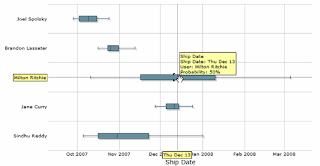
                        The tool uses a method called evidence based scheduling (a Monte Carlo simulation based on the historical estimates of developers), that predicts when will software ship (not an exact date, but the probability that software will ship on said date).


                        You can also see the estimation probabilities for the developers:


                        So how do you know if the tool is any good? Well, I haven’t tried it, but coming from Joel Spolsky's company, it has a good chance of being high quality (attention to detail, good UI). But you can see a video from the new version of the tool FogBuz 6.0 Movie Demo, try it out or read abook about it by Mike Gunderloy: Painless Project Management with FogBugz.

                        Monday, October 22, 2007

                        SQL 2008

                        Well, it looks like SQL 2008 is just around the corner, but it seems rather quiet for a new release. Maybe it's a small release, or MS isn't using all the marketing power.

                        Anyway, as the end of support for SQL 2000 is just 2 months after, looks like a comppeling reason to upgrade :)

                        Among the features for development that I like more are:

                        • Auditing data changes (new T-SQL command AUDIT that allows auditing centralization)
                        • Integration with Linq, Entity Framework, .NET 3.0
                        • MERGE statement (allows update, insert and delete in a single statement)
                        • Some general nice additions (that I won't use much, but look good to have), like date and time data types, file streams (uses the file system to store files pointed by the database), table valued parameters and Spatial Data

                        In the administration area, there are also some highlights:

                        • Data compression (those that worked with medium databases, know what a hassle it is to manage files with 100 GB in storage with less than 0,5 TB)
                        • Data encryption (columns, database)
                        • Resource Governor (limit resource usage by users or groups)
                        • Hot-plug CPUs!
                          To end the long post, some links about all the new features in more detail:

                        SQL Server 2008 Improvement Pillars

                        What's new in SQL 2008 Part 1
                        What’s new in SQL 2008 Part 2
                        What’s New in SQL Server 2008 Part 3

                        Saturday, October 20, 2007

                        Programming Language Humor

                        Great post about programming language (religious) wars with exceptional humor: Language Trolling Post You'll Ever Need To Read (Hopefully). And don't miss the comments, as some of them are of the same quality :)

                        In the end, programming languages are just tools and the companies behind them, the supporters. Never quite got it why some people take a critic to a programming language or a company personally...

                        Friday, October 19, 2007

                        Source Code

                        Scott Hanselman has a new column/category (Hanselman - Weekly Source Code) based on the tag to be a better developer started by Justice Gray (Be a Better Developer in 6 Months).

                        Like Justice Gray committed to reading 1 book per week, Scott Hanselman started reading good source code (as it's one of the best ways to be a better programmer, with which I deeply agree - Reading to Be a Better Developer - The Coding4Fun DevKit).
                        In one of the recent blogs in this category, I discovered this post: LukeH and a fully LINQified RayTracer. It's a LINQified C# ray tracer (in one Linq Expression that extends over 60 lines!!):

                        var pixelsQuery =
                        from y in Enumerable.Range(0, screenHeight)
                        let recenterY = -(y - (screenHeight / 2.0)) / (2.0 * screenHeight)
                        select from x in Enumerable.Range(0, screenWidth)

                        ...

                        select new { X = x, Y = y, Color = traceRay(new TraceRayArgs(ray, scene, 0)) };

                        He advises against this type of programming (big bang methods/expressions), but it's one heck of an example for Linq.

                        In the same vein, he links to a list of Programming Guiding Principles by Patrick Cauldwell (This I Believe- The Developer Edition), that start with general principles and has good advices on Unit Tests, Test coverage, Buy vs Build, Dependencies, Contracts (code), Visibility, Authentication, Tracing, Error handling and The definition of done (it means different things to every developer that I know).

                        Reading all this stuff about code (and the code itself), I started thinking about what are good qualities of Source Code. So, to every beginner (and as a reminder to all senior developers that practices and repetition makes perfection) go [re-]read Code Complete by Steve McConnell...

                        To me, the first that comes to mind is:

                        • stop and think for five minutes before defining the name of a method, variable;
                        • think early on on the design of the code (method or class), it's complexity, performance and all other important characteristics;
                        • DRY (Don't repeat yourself - don't copy paste code, documentation, use cases, ...)
                        • KISS (Keep it Simple ..., the design, the methods)
                        • ...

                        Thursday, October 04, 2007

                        Functional Programming Examples?

                        Recently, Mario Romano and me did a presentation about Language Trends, focusing on Linq and the .NET framework. It's clearly a trend in .NET, and there are some great blogs about FP in .NET:

                        Wes Dyer

                        Wesner Moise nStatic

                        Mechanical Bride

                        FP Tutorial

                        This one focuses more on Lisp, Haskell and other FP languages, but gives an hand to us imperative programmers:

                        http://www.defmacro.org/rss/news.xml


                        My main problem is applying this to practical day to day examples. I've seen many examples of the Fibonnaci, Hanoi Towers and others that are great to get your hands on code, and I can relate to the advantadges of FP (composability, restriction on side effects, conciseness/terseness?).

                        But I think that to convert more people (or at least look) to FP, there has to be some compelling examples that clearly show the advantadges. Maybe related to Web programming (continuations), or meta-programming (get rid of code generators/copy-paste and with the aid of expression trees and higher order functions, define the basic skeleton of methods - try , validate, call some function passed in, log exception, commit, rollback).


                        Any good examples/ideas?